
custom domain emails in Gmail for about $1 a month
I had Claude build it on AWS. No Google Workspace, no monthly fee.

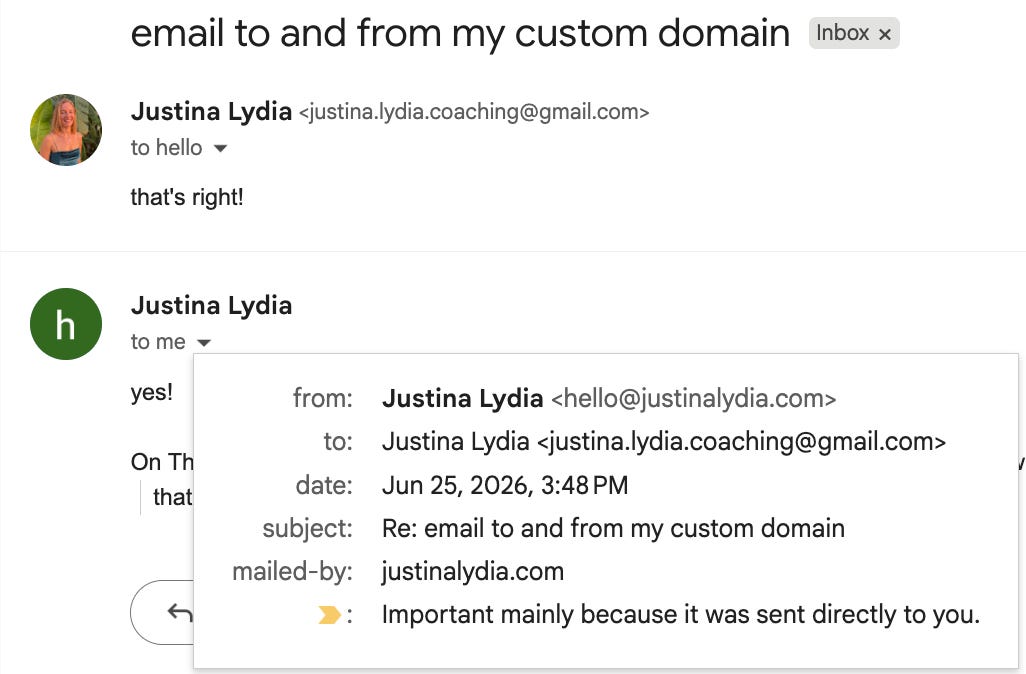
I own four domains and I wanted a real inbox at each one, like hello@justinalydia.com, landing in the Gmail I already read every day. Both of the usual ways to do that cost money. Google Workspace is around $7 per user per month, and you pay it again for every domain. Forwarding services look free until you add a few domains or want to send mail as well as receive it.
I did not want to wire up AWS by hand either, so I had Claude do it. Described what I wanted, and it built the whole thing: inbound mail hits Amazon SES, a small function rewrites the headers, and it forwards to my Gmail. Replies go back out through SES so they come from the domain, not from my personal address. It also wrote tests and set up alarms that email me if anything ever breaks. Four domains, one setup, about a dollar a month.
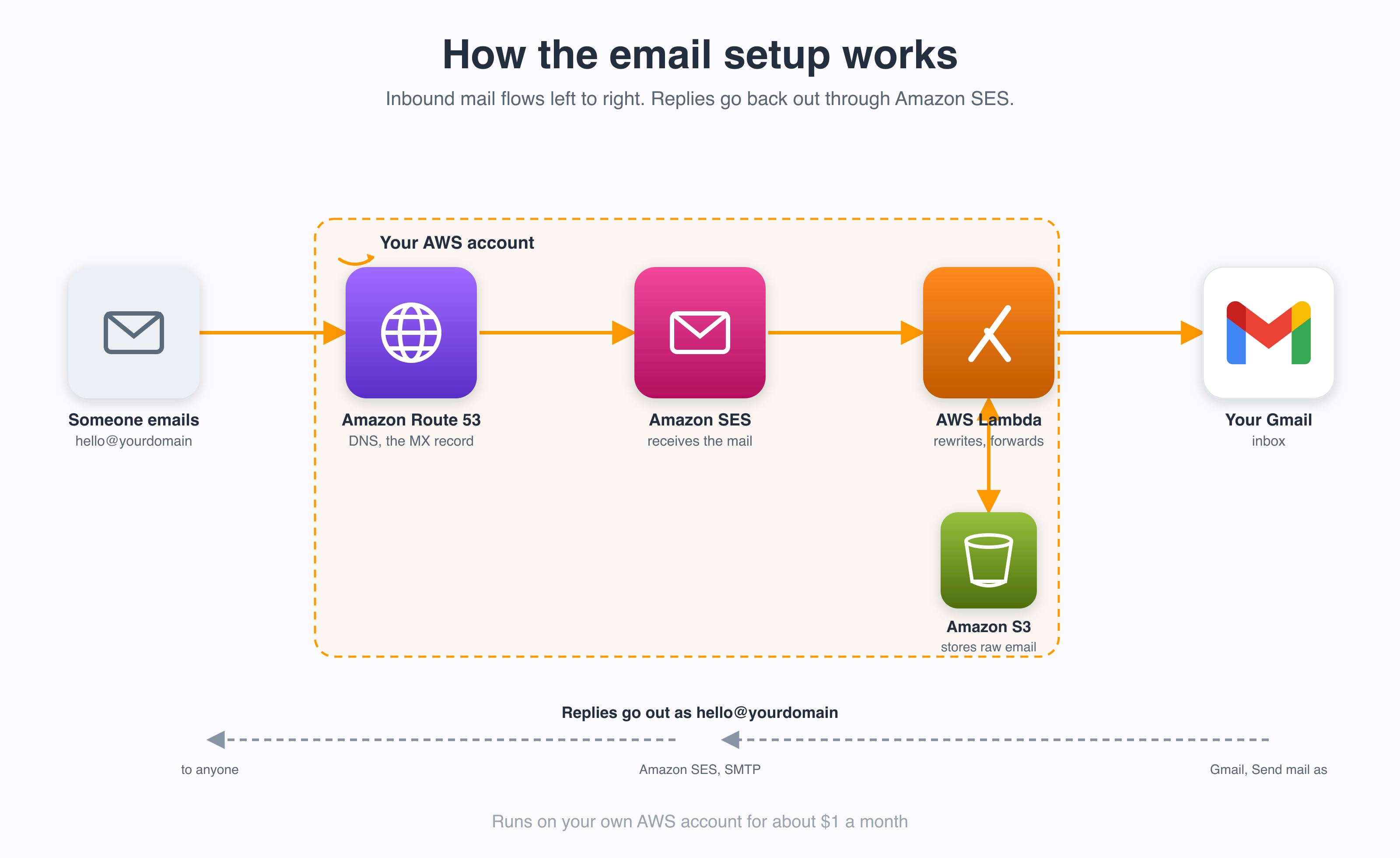
It is all Terraform, and Claude put it in a public repo so you can do the same.
The easy way: hand the repo to Claude
You can read the README and run the commands yourself. Or you can do what I did and let Claude drive. Clone the repo, open it in Claude Code, and tell it to set up email forwarding for your domains. It will fill in the config, run Terraform, watch the DNS verification, and stop to ask you before it touches anything live. The parts a machine cannot do for you, like clicking a verification link, it hands back with clear instructions.
This is the actual work it does:
1. Reads your domains and where each should forward.
2. Stands up SES, the function, and storage without touching your mail yet.
3. Waits for verification, then switches your MX record to AWS.
4. Wires up the reply path and the monitoring.
Giving Claude AWS access without losing sleep
You do not paste any keys into the chat. Claude Code runs on your machine and uses your normal AWS CLI login, so credentials never go through the conversation. A few things I would do anyway:
- Use a separate IAM user for this, or better, short-lived credentials from AWS SSO. Do not hand it your root account.
- Keep the approval prompts on. Claude asks before it changes anything, and it shows you the Terraform plan first. Mine refused to flip my live DNS until I confirmed, which is exactly what you want.
- Set a billing budget before you start, so a mistake cannot run up a surprise.
- Rotate or delete the credentials you used once you are done.
- Secrets stay out of git. The repo keeps your addresses and Terraform state files ignored by default.
The parts only you can do
A few steps need a human, and Claude walks you through each:
- Click the verification link SES emails to your forwarding address.
- In Gmail, add hello@yourdomain under “Send mail as” with the SMTP details the setup prints. One credential set covers every domain.
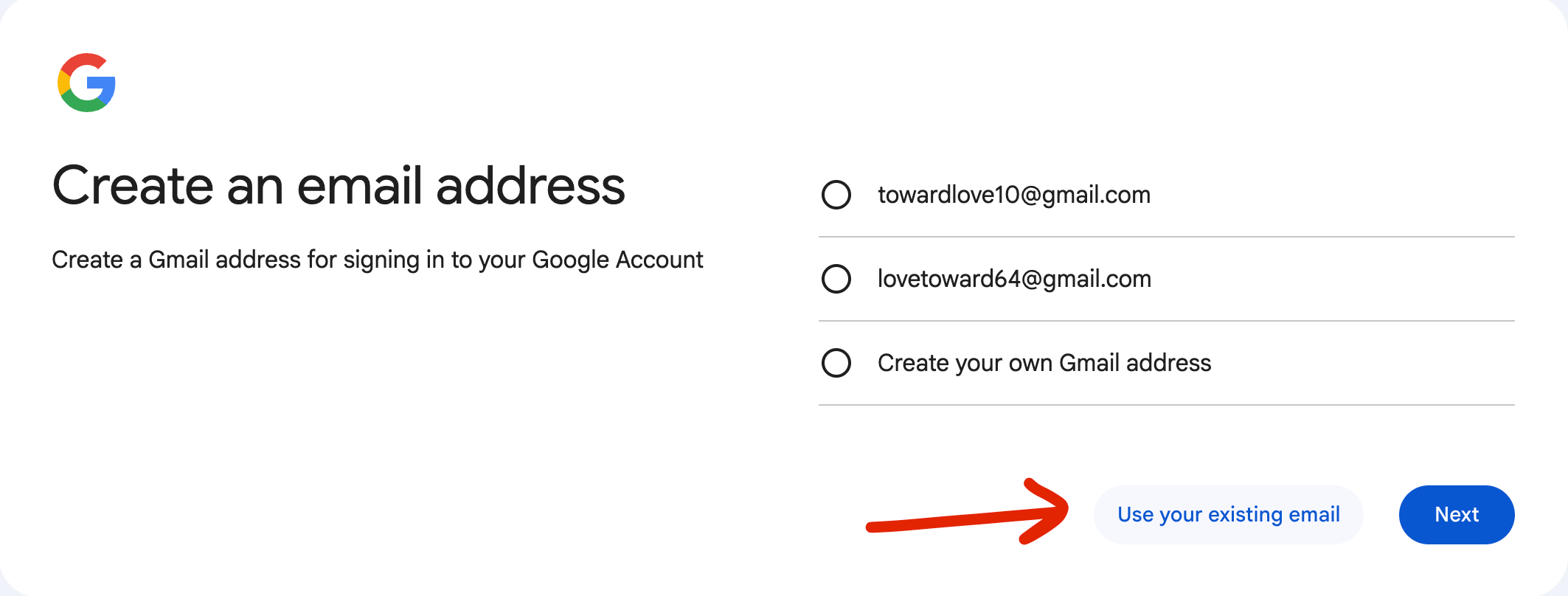
- To show your photo next to your emails, give the address its own free Google account:, “Use your existing email”, enter hello@yourdomain, and set a profile picture. (Google hides that link. Use a signed-out browser and pick “For my personal use”.)
On the “How you’ll sign in” / “Choose your Gmail address” screen, click the small link “Use your existing email” (below the Gmail options).
By default AWS only lets you send to verified addresses. To reply to anyone, request production access in the SES console. It is free and mine was approved within a few minutes.
Time and cost
About 30 to 45 minutes start to finish, and most of that is waiting on DNS and verification while Claude does the typing.
Receiving, sending, the function, and storage all sit inside AWS free tiers at personal volume. The real bill is three alarms and one metric, the part that emails me if forwarding goes down. Drop those and it rounds to zero. Route53 charges 50 cents per domain for the DNS zone, which you pay either way.
If you have domains sitting around and you are paying for email on them, this is the cheaper way, and you barely have to do it yourself.
Clone it and point Claude at it: https://github.com/jjanczyszyn/custom-domain-email